
Client onboarding is one of those freelance processes that looks simple until you have several clients moving through it at the same time.
A new client signs the agreement. Then you need to collect information, confirm payment, send a welcome email, create folders, set up the project, create tasks, schedule meetings, and make sure nothing gets missed.
When you handle every step manually, onboarding can become a long chain of small administrative tasks.
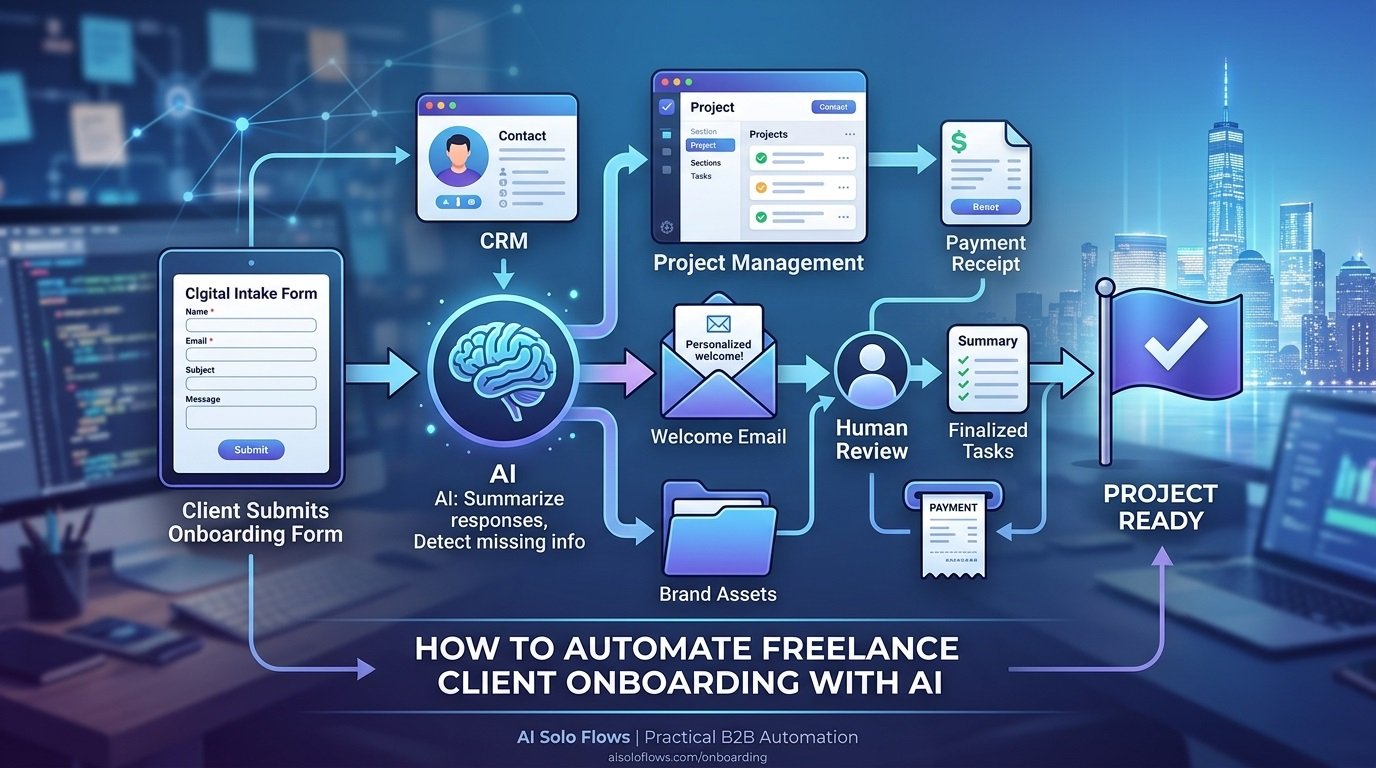
AI can help automate much of that process.
The goal is not to let AI run your client relationships. Instead, you can connect forms, email, payment systems, project-management software, your CRM, and AI into a repeatable workflow that handles predictable work while you stay involved in important decisions.
This guide explains how to automate freelance client onboarding with AI, what parts of the process are worth automating, where human review belongs, and how to build a practical onboarding system without creating unnecessary complexity.
Table of Contents
- What Client Onboarding Includes
- The Manual Onboarding Problem
- How an AI Client Onboarding Workflow Works
- Intake Form
- Contract and Payment
- Welcome Email
- Client Information Summary
- Project Setup
- Task Creation
- Follow-Up
- Where Human Review Belongs
- Tools for Automating Client Onboarding
- Common AI Automation Mistakes to Avoid
- AI Automation Best Practices for Solopreneurs
- How AI Solo Flows Can Help
- Frequently Asked Questions
- Conclusion
What Client Onboarding Includes
Freelance client onboarding is the process of moving a new client from “project approved” to “ready to work.”
Depending on the freelancer and service, onboarding may include:
- Sending or signing a contract
- Collecting payment or a deposit
- Gathering client information
- Collecting brand assets or documents
- Creating a client record
- Creating a project
- Setting deadlines
- Creating standard tasks
- Sending a welcome email
- Scheduling a kickoff call
- Sharing communication guidelines
- Confirming project requirements
- Following up on missing information
Not every freelancer needs every step.
A freelance copywriter may need a detailed content brief and brand guidelines. A consultant may need business information, access to existing systems, and a list of priorities. A designer may need logos, fonts, images, brand colors, and examples of preferred styles.
The best automation reflects the actual onboarding process rather than forcing every client through the same generic sequence.
The Manual Onboarding Problem
Manual onboarding usually fails in one of two ways.
The first is repetitive administrative work.
You copy a client’s name and email into several systems. You create the same project structure again. You write another welcome email. You create the same standard tasks.
The second is things getting forgotten.
A freelancer may remember to create the project but forget to request a missing document. Or the client may submit an onboarding form, but nobody notices that an important field was left blank.
Automation can address both problems.
A well-designed workflow can move information between systems and create reminders when something requires attention.
Instead of:
Client signs → Freelancer remembers everything → Freelancer performs every step manually
you can build:
Client signs → Workflow triggers → Information is processed → Systems are updated → Freelancer reviews exceptions
That distinction matters.
The purpose of automation is not to remove the freelancer from onboarding. It is to remove unnecessary manual coordination.
How an AI Client Onboarding Workflow Works
A typical AI onboarding workflow can be represented as:
Trigger → Data collection → AI processing → Automation → Human review → Project ready
For example:
Client submits onboarding form → AI summarizes responses → CRM is updated → project is created → tasks are generated → freelancer reviews → kickoff begins
Traditional automation can handle many of these steps.
AI becomes useful when the workflow needs to interpret information rather than simply move it.
For example, a rule-based automation can create a project when a payment is received.
AI can go further by reading a client’s project description and identifying:
- Main objectives
- Deliverables
- Important requirements
- Missing information
- Potential questions
- Relevant project category
That makes AI a useful processing layer inside the workflow.
1. Intake Form
The intake form is the foundation of a good onboarding workflow.
Instead of collecting client information through scattered emails, create a structured onboarding form.
Depending on your service, it could collect:
- Company name
- Contact information
- Business description
- Project goals
- Target audience
- Services requested
- Project requirements
- Preferred communication method
- Important deadlines
- Existing assets
- Links to relevant websites
- Files or documents
Keep the form focused.
A common mistake is asking every possible question before the project has even started. Only collect information you actually need.
Where AI helps
Once the form is submitted, AI can analyze the responses and create a concise internal summary.
For example:
Trigger: Client submits onboarding form
AI: Summarizes goals and identifies missing information
Action: Summary is added to the project record
Result: Freelancer can understand the project without manually reviewing every field
The original form responses should remain available. The AI summary is an aid, not the authoritative source.
2. Contract and Payment
Contract and payment steps should generally rely on deterministic automation rather than AI.
For example:
Contract signed → Payment status checked → Onboarding workflow activated
or:
Payment received → Project status changed to “Onboarding” → Client receives onboarding instructions
There is little reason to use an AI model to determine whether an invoice has been paid if your payment or accounting system already provides that information.
This is an important automation principle:
Use standard automation for predictable rules. Use AI when interpretation is actually needed.
For example:
- Payment received? Use a rule.
- Contract signed? Use a rule.
- Client’s project description summarized? AI may help.
- Client’s requirements categorized? AI may help.
This keeps the workflow simpler and more reliable.
3. Welcome Email
A welcome email can be triggered automatically once the appropriate onboarding conditions are met.
For example:
Payment confirmed → Welcome email sent → Onboarding form linked → Next steps explained
The message can include:
- Thank-you message
- What happens next
- Onboarding form
- Expected response time
- Communication instructions
- Kickoff information
- Link to the client portal or project workspace
You can use an approved template rather than asking AI to create a new message every time.
AI can personalize the message when appropriate, but personalization should not introduce inaccurate project information.
For higher-value projects, you may prefer:
Workflow drafts email → Freelancer reviews → Email sent
rather than fully automatic delivery.
4. Client Information Summary
This is where AI can provide significant value.
Client forms can contain a lot of information, and the freelancer may not want to reread the entire response every time they open the project.
AI can transform the raw information into a structured internal brief.
For example:
Client Overview
Business: Example Consulting
Project: Website redesign
Primary objective: Improve lead generation
Target audience: B2B service businesses
Key requirements: New messaging, service pages, contact flow
Deadline: Client-provided target date
Missing information: Brand guidelines and existing analytics access
The exact format can be customized for the freelancer’s service.
A consultant may need business objectives.
A designer may need creative direction.
A developer may need technical requirements.
A copywriter may need audience, positioning, offers, tone, and existing content.
The AI prompt should reflect those requirements.
5. Project Setup
Once onboarding information is complete, automation can create the project environment.
A workflow might connect:
Client record → Project-management tool → Folder → Calendar → CRM
Depending on the tools being used, automation can create:
- Project
- Client folder
- Standard project sections
- Calendar event
- Communication channel
- Client record
- Internal notes
For example:
Payment confirmed → Create project from template → Add client information → Assign default tasks → Notify freelancer
This is often a better candidate for conventional automation than AI.
You already know what should happen.
The workflow simply needs to do it consistently.
6. Task Creation
Every freelance service has recurring steps.
A website project might include:
- Discovery
- Sitemap
- Copy review
- Design
- Development
- Testing
- Launch
A content project might involve:
- Brief
- Research
- Draft
- Review
- Revision
- Approval
- Publishing
Create templates for these recurring processes.
Then use automation to generate the appropriate tasks when a project begins.
Where AI adds value
AI can help when the project differs significantly from your standard template.
For example:
Client onboarding form → AI identifies project type → Appropriate project template selected → Tasks created
A freelance marketing consultant might have separate templates for:
- SEO audits
- Content strategy
- Local SEO
- Consulting engagements
- Monthly retainers
The AI can help classify the project, while predefined automation handles the actual task creation.
That division keeps the system manageable.
7. Follow-Up
The onboarding process should not stop after the first email.
Clients may forget to submit:
- Brand assets
- Access credentials
- Project information
- Content
- Existing documentation
- Approval forms
Instead of manually checking every project, create reminders.
For example:
Onboarding form incomplete → Wait → Reminder task created
Or:
Required document missing → Notification → Freelancer reviews → Client follow-up sent
AI can help identify missing information from unstructured responses, but simple required fields should be handled by the form itself.
There is no reason to use an LLM to detect that a required email field is empty.
Where Human Review Belongs
Good AI automation does not mean removing people from the process.
For freelance onboarding, human review is especially useful when:
- Client requirements are unclear.
- The project scope is unusual.
- A client provides contradictory information.
- Sensitive information is involved.
- The workflow detects a potential issue.
- A message requires a personal response.
- Pricing or contractual questions arise.
- The AI summary does not match the original information.
A useful model is:
| Task | Automation | Human Review |
| Create client record | Yes | Usually no |
| Check payment status | Yes | When exceptions occur |
| Create project | Yes | Sometimes |
| Summarize intake | AI | Recommended |
| Identify missing information | AI + rules | Yes |
| Send routine welcome email | Optional | Recommended for important clients |
| Decide project scope | No | Yes |
| Change pricing | No | Yes |
| Handle unusual client concerns | No | Yes |
The goal is not maximum automation.
The goal is appropriate automation.
Tools for Automating Client Onboarding
You do not need a large technology stack to automate client onboarding.
A practical setup might contain:
- Form tool: Collect client information.
- CRM: Store client records.
- Project-management platform: Manage delivery.
- Email platform: Send onboarding communication.
- Payment or invoicing system: Confirm payment status.
- AI model: Summarize and classify unstructured information.
- Automation platform: Connect the systems.
- Cloud storage: Store project documents and assets.
No-code and low-code platforms can connect many of these systems without traditional software development.
For more advanced workflows, APIs and webhooks can provide greater control.
AI assistant vs. AI workflow
An AI assistant responds when you ask it to perform a task.
An AI workflow connects multiple steps so information can move automatically between systems.
For example:
Assistant: “Summarize this client’s onboarding form.”
Workflow: “Whenever a new onboarding form is submitted, summarize it, store the summary in the project record, check for missing information, create the appropriate project tasks, and notify me if something needs review.”
For a freelancer, the second approach is usually more useful for recurring operational processes.
Common AI Automation Mistakes to Avoid
Automating a broken onboarding process
If your onboarding process is confusing manually, automation will not automatically fix it.
Map the process first.
Automating everything at once
Start with one workflow.
A simple system that works consistently is more valuable than a large system that constantly needs troubleshooting.
Choosing tools before defining the process
Do not start with:
“What AI tool should I buy?”
Start with:
“What happens between the moment a client signs and the moment the project is ready?”
Then determine which tools are necessary.
Ignoring human review
AI summaries can be wrong or incomplete.
Keep important information reviewable.
Using AI where rules are better
Payment confirmation, form validation, and task creation often do not require AI.
Use AI where interpretation provides actual value.
Poor data quality
If your client information is incomplete or inconsistent, the workflow will have limited information to work with.
Weak AI instructions
Tell the AI exactly what to extract, how to format it, what it should not assume, and what to do when information is missing.
No error handling
Plan for failed integrations, incomplete forms, duplicate submissions, unavailable applications, and unexpected AI output.
No monitoring
Automation is not a “set it and forget it” project.
Review workflow runs and exceptions periodically.
Security and privacy oversights
Client onboarding can contain sensitive business information.
Only send the information necessary for each workflow step, use appropriate permissions, and understand the data policies of the tools you connect.
NIST’s AI Risk Management Framework recommends considering trustworthiness and risk throughout the design, development, use, and evaluation of AI systems. Its framework is intended to help organizations manage AI risks while remaining flexible across different use cases. NIST+1
AI Automation Best Practices for Solopreneurs
Start with repetitive work
Look for steps you perform every time a client starts a project.
Define the process before choosing tools
Document the current onboarding process from beginning to end.
Keep the workflow simple
Every additional application and integration creates another potential failure point.
Use human approval where it matters
Keep people involved in scope decisions, sensitive communication, pricing, contracts, and unusual situations.
Separate rules from AI
Use deterministic automation for predictable tasks and AI for tasks involving language, classification, summarization, or interpretation.
Protect client information
Understand what information each system receives and whether it actually needs access to that information.
For example, OpenAI’s current API documentation states that data sent to its API is not used to train or improve its models unless the customer explicitly opts in, while also describing certain forms of data storage and abuse-monitoring retention. Policies can differ across products and providers, so review the current documentation for the specific tools in your workflow. OpenAI Platform
Document important workflows
Record:
- Trigger
- Inputs
- AI instructions
- Actions
- Connected tools
- Approval points
- Error conditions
- Owner
- Recovery process
Measure the operational impact
Track practical indicators such as:
- Number of manual steps
- Onboarding tasks completed automatically
- Missing information
- Workflow failures
- Follow-up tasks
- Administrative time
Improve gradually
Your first workflow does not need to be perfect.
Build a reliable version, observe where it breaks, and improve it.
How AI Solo Flows Can Help
AI Solo Flows focuses on practical AI automation for solopreneurs, freelancers, consultants, creators, and small businesses.
The approach is to start with the business process rather than the technology. That means identifying repetitive work, mapping the workflow, determining where AI genuinely helps, and connecting the necessary applications.
For freelance client onboarding, that could mean designing a workflow that connects:
Form → CRM → AI → Email → Project Management → Tasks → Notifications
The automation can handle repetitive coordination while leaving important decisions with the freelancer.
AI Solo Flows can help with:
- Identifying automation opportunities
- Mapping existing processes
- Designing AI-powered workflows
- Connecting business applications
- Automating repetitive administrative tasks
- Building onboarding workflows
- Adding AI-powered classification and summarization
- Creating human approval steps
- Improving workflow reliability
The goal is not to automate every part of client onboarding. It is to build a system that makes the process easier to manage and more consistent.
If you are unsure which part of your onboarding process should be automated first, a free consultation can help you identify a practical starting point.
Frequently Asked Questions
Can AI automate freelance client onboarding?
Yes. AI can help automate intake processing, client summaries, project setup, task creation, follow-up, and routine communication. Important decisions such as scope, pricing, contracts, and unusual client issues should remain under human control.
What should I automate first in client onboarding?
Start with repetitive administrative steps such as collecting information, creating client records, generating standard project tasks, and sending routine onboarding messages.
Can AI create a project automatically after a client signs?
Yes. A workflow can use a contract or payment event as a trigger and then create a project, folder, task list, and notification automatically.
Should AI send the client welcome email?
It can, but human review is often preferable for important clients. A good approach is to use a pre-approved template and allow AI to personalize limited details without changing important project information.
What tools do I need for automated client onboarding?
A typical setup includes an intake form, CRM or database, email platform, project-management system, payment or invoicing tool, AI service, and automation platform. You only need the tools required for your actual process.
Is no-code automation enough for freelance onboarding?
For many freelancers, yes. No-code and low-code platforms can connect forms, CRMs, email, project tools, and AI without traditional programming. More advanced requirements may benefit from APIs or custom development.
How do I keep AI from making onboarding mistakes?
Use structured inputs, clear AI instructions, validation rules, human approval for important actions, error handling, and workflow monitoring. Keep the original client information available so AI-generated summaries can be checked.
Is automating client onboarding worth it for a solo freelancer?
It can be worthwhile when onboarding happens frequently and includes repetitive steps. The best candidates are predictable processes where automation saves manual coordination without creating excessive maintenance.
Conclusion
The best way to automate freelance client onboarding with AI is not to hand the entire process over to an AI system.
Instead, separate the workflow into predictable actions and judgment-heavy decisions.
Use automation for tasks such as creating records, checking payment status, generating project templates, creating standard tasks, and sending routine notifications.
Use AI when the workflow needs to understand information—for example, summarizing an onboarding form, identifying missing details, or categorizing a project.
Then keep human review where context and judgment matter.
A practical onboarding workflow might look like:
Client signs → Payment confirmed → Intake form → AI summary → Project created → Tasks generated → Missing information flagged → Freelancer reviews → Kickoff
That is enough to remove a significant amount of repetitive coordination without making the client experience feel robotic.
Start with one part of your onboarding process, make it reliable, document it, and expand from there.
Author Bio
Alex | AI Automation & Workflow Architect With 10+ years in business automation and 5+ years building commercial AI workflows, Alex specializes in scaling solopreneur operations. As a former agency owner, every blueprint and prompt Alex shares is personally deployed, benchmarked, and execution-tested in live environments before publication.